
Automation
No Retyping, Nightly Accuracy: HelloDataManager Syncs Webstore Stock & Prices from Your Accounting
Introduction
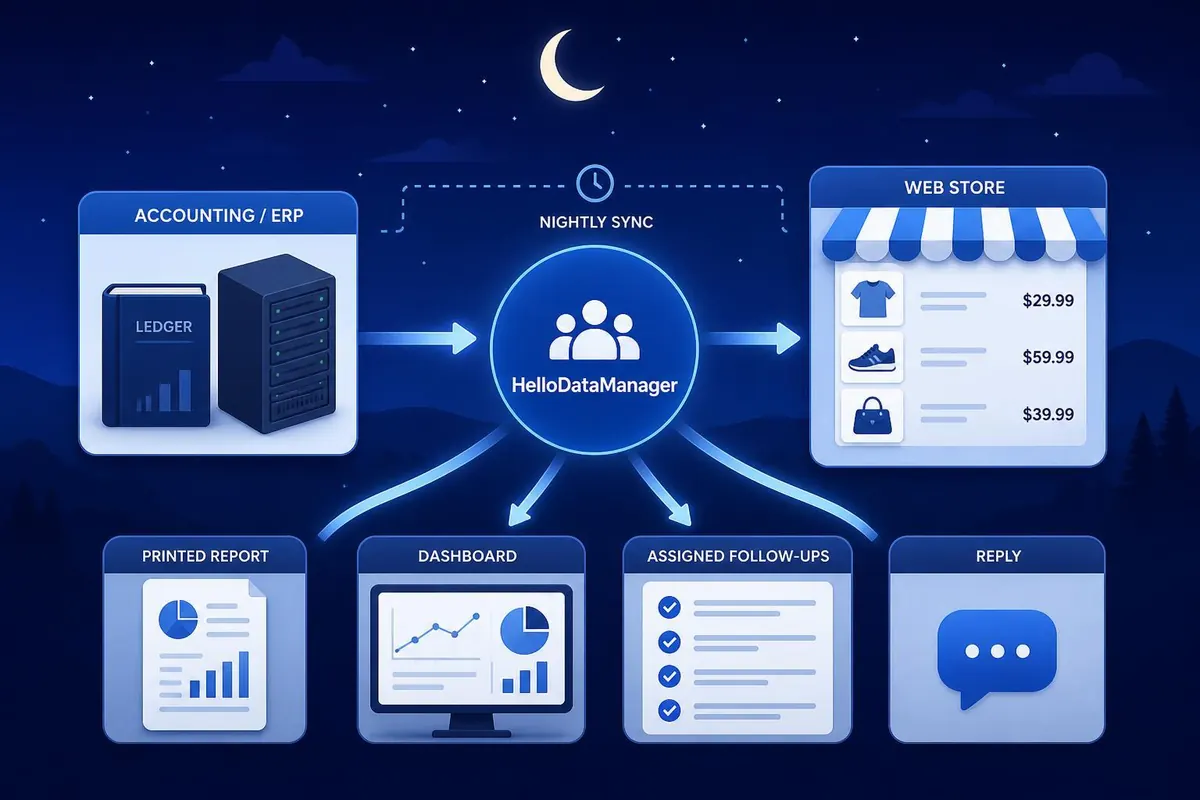
Keeping your web store stock levels and prices aligned with your accounting or ERP system is a common headache for small businesses. Re-entering quantities and prices by hand is error-prone, wastes staff time and causes stockouts or wrong prices online — which means lost sales and frustrated customers. This article explains a practical nightly workflow using HelloDataManager. HelloDataManager reads the accounting or ERP system you already run and delivers the answers you need as reports, a dashboard, assigned follow-ups or a reply by message. The goal is a dependable, overnight process that removes retyping while giving your team crisp actions they can apply to keep the online store accurate.
Why nightly stock and price sync matters
Inventory and pricing drift during the business day: purchases, returns, stock adjustments and supplier price changes all affect what should appear in your online shop. For small businesses in British Columbia this is especially important because sales windows can be tight and margins small. A nightly sync captures the full day’s transactions in the accounting or ERP data and produces a single, authoritative snapshot to use for updating the web store.
- Accuracy: One source of truth reduces contradictory data between systems.
- Efficiency: Doing updates once, at night, concentrates work into a short, predictable window.
- Customer trust: Correct stock and price information lowers cancellations and disputes.
How HelloDataManager reads your accounting or ERP and delivers answers
HelloDataManager connects to the accounting or ERP system you already run and reads the relevant data overnight. It does not alter your accounting records. Instead it interprets the latest quantities and prices and presents the actionable result in one or more of four ways:
- Reports — structured lists you can export or review.
- Dashboard — a visual snapshot of key discrepancies and priorities.
- Assigned follow-ups — tasks routed to specific staff members to make changes.
- Reply by message — a concise summary sent to the person responsible, for quick confirmation or manual action.
These outputs are designed to remove the need to retype data. Instead of manually comparing screens, your team receives a clear set of changes to apply to the web store. Whether your web platform requires manual entry or supports batch import, the nightly outputs make the required steps straightforward and auditable.
Preparing your systems and workflow for nightly updates
To get the most from HelloDataManager, prepare both technical and human elements. The technical side means ensuring the accounting or ERP contains reliable SKU, quantity and price fields and that HelloDataManager can access those fields. The human side means defining who receives follow-ups and what they do with them each morning. A simple, repeatable workflow keeps the process lean.
Steps to prepare:
- Standardize SKUs between accounting/ERP and the web store so reports map cleanly.
- Decide which output you want by default — a daily report, dashboard check or assigned follow-ups.
- Assign responsibility for follow-ups: who updates the web store, who approves price changes, who monitors low stock.
- Establish timing: schedule the read for after your accounting day closes so nightly data is complete.
Example nightly output and what it looks like
Below is an illustrative example of the kind of structured output HelloDataManager can generate. Use it to determine what your team will act on each morning.
| SKU | Accounting qty | Web store qty | Price in accounting (CAD) | Suggested action | Assigned follow-up |
|---|---|---|---|---|---|
| ABC-100 | 12 | 5 | $24.50 | Update web qty to 12 | Online store clerk |
| DEF-210 | 0 | 3 | $9.99 | Mark as out of stock | Online store clerk |
| GHI-330 | 50 | 50 | $120.00 | No action | — |
| JKL-410 | 7 | 7 | $15.75 | Price update suggested: accounting price changed from $14.99 | Store manager |
Measure benefits and estimate cost impact
Small businesses often ask whether the nightly process is worth implementing. Even limited automation of the information flow can show measurable gains. Consider a typical scenario:
- If a staff member spends 30 minutes each morning reconciling stock and prices at $20 per hour, that is $10 per day or roughly $2,600 per year (assuming 260 work days).
- Reducing order cancellations and refunds by preventing stockouts can save hundreds to thousands of dollars annually, depending on sales volume.
HelloDataManager’s value is in cutting the manual comparison and retyping step. By generating clear, nightly instructions you reduce time spent and the errors that lead to refunds and reputational cost. Use the dashboard and follow-up assignments to track how long actions take and to quantify savings over a quarter or year.
Conclusion
Maintaining accurate stock and prices in your web store without retyping is a practical, achievable goal for small businesses in British Columbia. HelloDataManager reads the accounting or ERP system you already use and delivers the answers you need each night as reports, a dashboard, assigned follow-ups or a reply by message. That nightly output becomes the single source your team acts on, reducing manual reconciliation and the mistakes that cost time and money. Prepare your SKUs and responsibilities, choose the outputs that fit your workflow, and run the read after your business day closes. Tracking time saved and fewer customer issues will show the return in a few months, making nightly sync a simple and cost-effective improvement.